




Before a Prop-Firm Payout Request: Reopen the Exact Current Rule Page
A practical evidence check before the request. Reopen the exact current provider page, bind it to your account path and record unresolved differences before changing the transaction state.
Writer introduction: I reopen the provider’s current payout rules. I then separate dashboard evidence from provider confirmation.

On this page

Before a prop-firm payout request, reopen the exact current rule page and bind it to the correct provider, product and account path.
- Record the page title, verified domain, access time and displayed update date.
- Capture the agreement reference and authenticated dashboard in one bounded collection window.
- Reconcile seven separate readiness states instead of relying on one balance or button.
- Preserve differences in a delta log and ask the provider one narrow question where needed.
- Save the authenticated request receipt and reconcile uncertain request state before any resubmission.
This limited check can reveal gaps; it cannot decide provider eligibility, approval or payment.
A stale bookmark, wrong account path or unexplained dashboard difference can undermine a careful request. This guide builds a compact, provider-specific record of what you opened, observed, calculated and could not resolve. Trading involves significant risk. You may lose capital. Complete the earlier rule-version audit first; trader-side evidence never controls the provider’s decision.
Regulatory-status disclosure: Scalping Wolf Live is an independent online trading-education platform, is not authorised or regulated by the FCA or another UK financial regulator, and does not provide regulatory clearance.
Want to practise disciplined review with other traders? Join the Scalping Wolf Live Discord community for educational discussion and accountability.
No. Scalping Wolf Live provides trading education and process discipline; it does not decide which terms govern your account or whether a provider will approve a request. The useful next step is to verify the exact provider evidence, preserve unresolved differences and keep the decision with the provider. Visit Scalping Wolf Live for its education and tools, then return to authenticated provider sources for account-specific decisions.
Start After the Rule-Version Audit
What must be settled before this checklist starts?
This procedure starts only after you have identified the candidate rule set for your account. Confirm the provider’s exact legal entity and domain, product, account stage, programme path and agreement reference. If any identity field is uncertain, return to the broader rule-version audit before collecting transaction-stage evidence.
Use Prop Firm Rule-Version Audit: Which Terms Apply to Your Account? first. Authenticated post 16693 owns rule-version applicability; this child guide records separate sources at the later transaction boundary without choosing contract precedence.
That division also prevents a useful checklist from becoming a competing answer to the broader question. Keep the prerequisite link visible, retain its authenticated destination exactly, and limit this page to capture, reconciliation, discrepancy handling and receipt preservation. If the provider, product or agreement identity changes, return to the prerequisite audit before continuing here.
Create a small identity header before opening any calculation:
- Verified provider domain and displayed legal entity
- Product or programme name and account stage
- Account-path label, recorded without exposing the account number
- Agreement title, version or effective-date reference if available
- Public rule-page title and URL
- Snapshot ID that links every later artefact
A logo is not identity evidence, and similar product names do not make paths interchangeable. Use the FCA Firm Checker and check relevant permissions where the product or service is within the FCA’s remit or the presenter claims FCA-regulated status (Source: Financial Conduct Authority). Absence from the Firm Checker does not itself classify the operator or activity. A stable identity header lets you define the capture window.
Open a Minimal Bounded Capture Record
How do you capture changing account information fairly?
Open one privacy-minimised record with a capture start, capture end, explicit time offset and any provider-displayed time. Sequential screenshots show a bounded collection interval, not one simultaneous provider state. Record any trade, order, reset or page change that occurs during that interval.
Use a neutral record ID and exclude credentials. Record start and end with explicit offsets under RFC 3339 and its RFC 9557 update (Source: RFC Editor). A local timestamp is metadata, not independent proof of clock accuracy.
Your capture header needs five fields:
| Field | Record | Limitation |
|---|---|---|
| Start | Timestamp with offset | Client-side metadata |
| End | Timestamp with offset | Does not prove simultaneity |
| Provider time | Only if displayed | Label the exact source |
| Change note | Trades, orders, reset or refresh | Record ‘none observed’ only if watched |
| Snapshot ID | Same ID on every artefact | Never embed secrets |
Minimise personal data to what is adequate, relevant and necessary for the purpose (Source: ICO). Capture only what supports a precise question.

Start with the provider’s own current rules, then use an educational framework to organise what you find. The Scalping Wolf Live Prop Trading Guide can help you understand prop-firm terminology, stages and rule categories, but it cannot replace your agreement or dashboard. Continue with the Prop Trading Guide and return to the provider for account-specific clarification.
Capture the Provider-Specific Source Stack
Which rule sources belong in the same record?
Keep the signed-agreement reference, current public page, any incorporated conduct pages and the authenticated dashboard as separate artefacts. Record title, URL, displayed date, access date, product context and known omissions. Do not treat one public FAQ as the complete private account record.
Open the exact page on the verified domain, not a search snippet. Record what it says and omits, then add the privacy-minimised agreement reference, authenticated dashboard state and any incorporated policy page.
Official material confirms variation. FTMO describes conditions for its own route and later review (Source: FTMO, accessed 30 August 2026). Topstep publishes distinct Standard, Consistency and Live paths (Source: Topstep, accessed 30 August 2026). Neither example transfers to another product.
For every source, save:
- Evidence ID and snapshot ID
- Exact page title and verified URL
- Displayed publication or update date, if present
- Your access date and bounded-window timestamp
- Product, stage and path to which the wording relates
- A short extract or screenshot with the surrounding qualification
- Known omissions, such as no private agreement or no account state
This source stack stops a useful current page from silently becoming an all-purpose answer. The next step is to compare distinct readiness states without collapsing them.
For structured educational practice around rules and process discipline, explore live mentorship at Scalping Wolf Live.
Reconcile Separate Eligibility States
Does one visible balance mean the account is ready?
No. Record trading-rule, account-product, KYC or KYB, jurisdiction, tax-document, payment-rail and request-window states separately. Each state needs its own named source. Use
DATA_NOT_AVAILABLEwhere evidence is missing; do not turn a positive balance or enabled button into article-issued provider approval.
Build one seven-row table. A dashboard may summarise several items without exposing every provider review state. Treat each row as a sourced question, never a universal conclusion.
| State | Evidence to record | Allowed result |
|---|---|---|
| Trading-rule | Current provider source plus account evidence | Confirmed / unresolved / not applicable / unavailable |
| Product | Product and stage labels | Same four values |
| KYC or KYB | Authenticated provider status only | Same four values |
| Jurisdiction | Current provider eligibility source | Same four values |
| Tax document | Provider requirement and dashboard state | Same four values |
| Payment rail | Current available method and account state | Same four values |
| Request window | Provider page and dashboard state | Same four values |
The table issues no aggregate PASS. Topstep says residence or citizenship can affect its services, but that is not a global rule (Source: Topstep, accessed 30 August 2026). Keep provider identity checks inside controlled channels and your packet minimised.
Run the reconciliation row by row. First, copy the provider’s exact label instead of translating it into your own shorthand. Second, attach one evidence ID and capture date. Third, select only a permitted state value. Fourth, write what remains unknown and which official source could resolve it. A row marked NOT_APPLICABLE still needs a reason; a row marked DATA_NOT_AVAILABLE must stay visibly incomplete. This discipline prevents a complete-looking table from concealing a missing jurisdiction check, payment-rail condition or request-window source. It also makes later review efficient: the reader can retest only the changed row while preserving the untouched evidence lineage. Keep every state readable and testable so another reviewer can trace its source without reopening unrelated evidence.
Use Left and Right arrow keys to pan the full infographic.
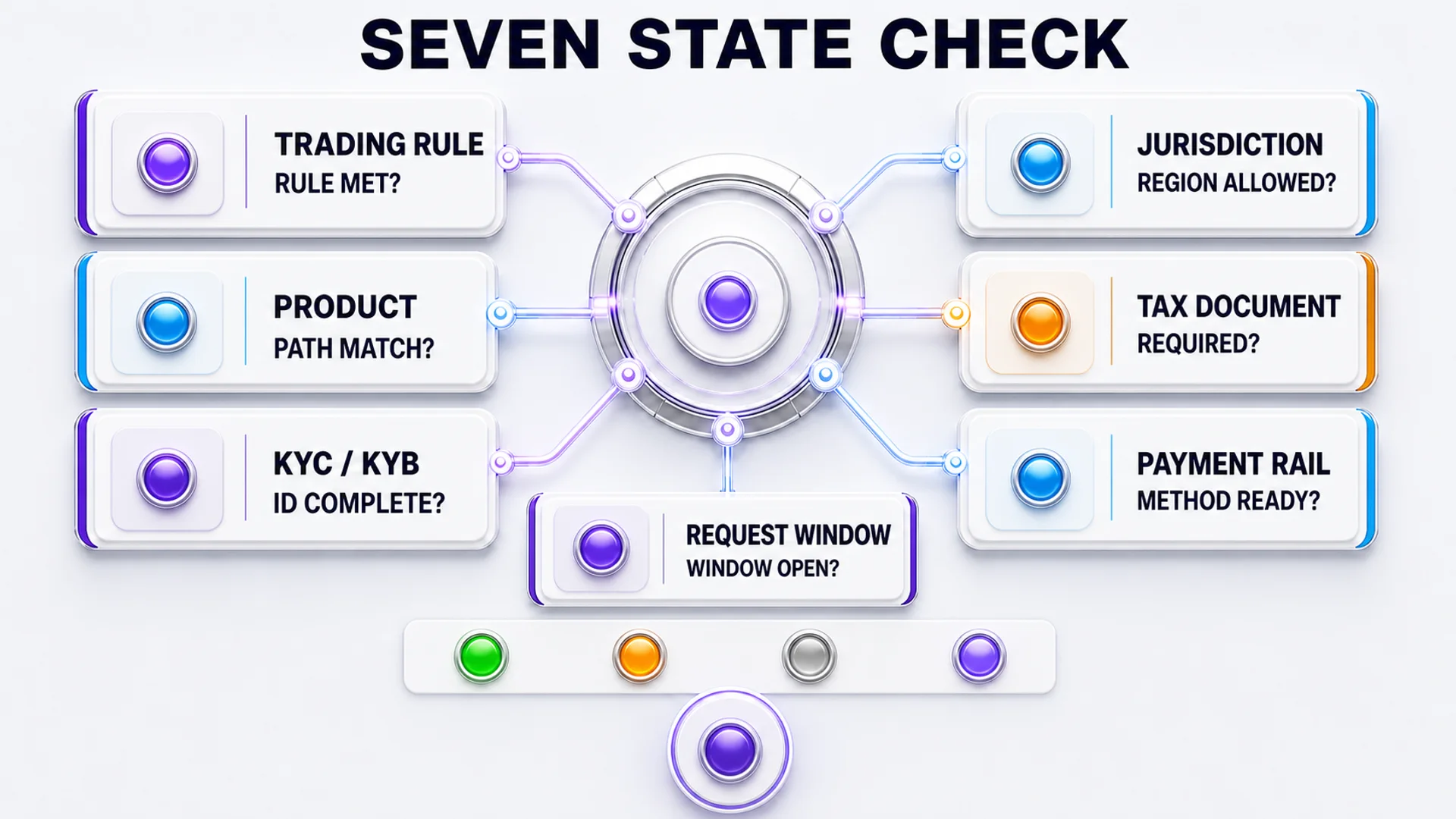
Keep the uncertainty visible rather than filling gaps with assumptions. A useful packet identifies each missing source, assigns an evidence ID and turns the gap into one narrow provider question. For more relevant education without converting uncertainty into approval, browse Prop Firm Challenge Mastery and keep every account-specific conclusion provider-controlled.
Run a Bounded Calculation Check
How should you check the visible request amount?
Use only provider-defined inputs from the exact product and path. Record the formula source, units and time basis, then compare the estimate with the authenticated dashboard. Missing inputs remain
DATA_NOT_AVAILABLE. A trader-side calculation is a reasonableness check, not the provider’s approved or settled amount.
Write the calculation symbolically before inserting any account values:
estimated_net = provider_defined_requestable_base × provider_defined_profit_share_rate − provider_fee − third_party_fee
Do not merge dashboard profit, requestable base and settlement, or borrow inputs from another product. FTMO’s objectives show calculation variation even between its own products (Source: FTMO Trading Objectives, accessed 30 August 2026), so a universal formula is unsafe.
For each input, record five attributes:
- Field name exactly as the provider uses it
- Visible value and unit
- Direct source URL or authenticated dashboard evidence ID
- Product, path and time basis
- Status: sourced, unresolved or unavailable
Keep your estimate, the dashboard figure and the provider decision separate. If values differ, do not tune the formula to force agreement; send the exact fields to the delta log.
Write the Evidence-ID Delta Log
What should you do when two sources disagree?
Create one delta row for each field. Bind source A, source B, capture dates, observed values and the next official question. Use only
MATCH,EXPLAINED_DIFFERENCE,UNRESOLVEDorSTALE_SOURCE. Do not infer provider fault, trader fault or legal precedence from the mismatch.
A delta log records where two captured sources agree or differ. It gives support one bounded question and keeps a later edit from erasing the earlier state.
| Delta ID | Field | Source A | Source B | Status | Next official question |
|---|---|---|---|---|---|
| D-01 | Request window | Public-page evidence ID | Dashboard evidence ID | UNRESOLVED | Which window applies to this product and account stage? |
| D-02 | Product label | Agreement reference | Dashboard evidence ID | MATCH | None |
| D-03 | Displayed amount | Calculation record | Dashboard evidence ID | UNRESOLVED | Which provider-defined input explains the difference? |
These are templates, not real-account claims. Keep values blank until authenticated evidence exists. When dates or wording differ, preserve both and ask the provider; this article cannot decide precedence.
A precise delta row now gives support something answerable, which is the purpose of the next stage.

No. A disciplined method can improve how you prepare, record evidence and stop before an unsupported action, but it cannot establish provider eligibility or payment. If you want to strengthen rule-following habits alongside this verification process, explore Wolf Strike Scalping as education, then rely on the provider’s authenticated sources for the actual request.
Bind a Verified Support Read-Back
How do you ask support a useful question?
Use only a verified provider domain or authenticated dashboard channel. Ask one discrepancy-specific question tied to the snapshot, product, path and evidence IDs. Save the ticket ID, exact question, response date and stated limitations. A support answer is not automatically a contract amendment or legal ruling.
Send a minimised question: name the product, stage, two evidence IDs and the exact conflicting field. Ask for the applicable source or account-state explanation, not confirmation of your conclusion.
A practical message structure is:
- Snapshot:
PR-YYYY-MM-DD-X - Product and account stage: exact provider labels
- Source A: evidence ID, title, URL and access date
- Source B: dashboard or agreement evidence ID
- Difference: one field and two observed values
- Question: “Which source and value applies to this product and stage at this request boundary?”
- Privacy note: credentials and unnecessary identity data removed
Preserve the verified channel, ticket ID, date and scope. Mark the field resolved, explained or unresolved without turning one reply into an all-account rule.
Seal Integrity and Preserve the Request Receipt
What does a hash and request receipt prove?
Preserve original files, a manifest and separately retained SHA-256 digests. Digest comparison can detect later byte changes against a trusted reference digest; it does not prove truth, source authenticity, completeness, capture time, legal effect or payout eligibility. Keep any authenticated provider request receipt as a separate state.
A message digest is calculated from file bytes. NIST defines SHA-256 and recommends preserving originals with integrity information retained separately (Source: NIST FIPS 180-4 and NIST IR 8387). Matching bytes can still preserve an incomplete artefact.
Seal a compact packet containing:
- Snapshot identity header and capture window
- Source register and privacy-redaction note
- Seven-state table
- Calculation record with unavailable fields preserved
- Delta log and verified support read-back
- File manifest and separately stored reference digests
- Bounded disposition: no unresolved discrepancy found in limited self-check, pause for provider clarification, or insufficient evidence
- Authenticated provider request receipt, if a request is later submitted
Scalping Wolf Live adds one internal V5 exact-once safety recommendation: if a submission response is ambiguous, reconcile the authenticated provider state before any resubmission. This is Scalping Wolf Live process guidance, not FTMO, Topstep or universal provider policy. A delayed page or missing response does not prove that no request exists.
Treat the request receipt as a new transaction artefact, not a replacement for the pre-request packet. Record the provider-generated request identifier, authenticated status, response time if displayed and the exact account path. If the transport outcome is unclear, preserve the observed response and query authenticated state before taking another action. Three states are honest: the request is confirmed present, confirmed absent under provider evidence, or unresolved. The unresolved state never authorises a duplicate submission. Keep the receipt and the pre-request snapshot linked by identity, while retaining their separate capture times and evidence ceilings.
The packet cannot certify provider approval or payment. It can expose gaps, preserve a precise clarification path and improve your process without exceeding its evidence.
Use Left and Right arrow keys to pan the full infographic.
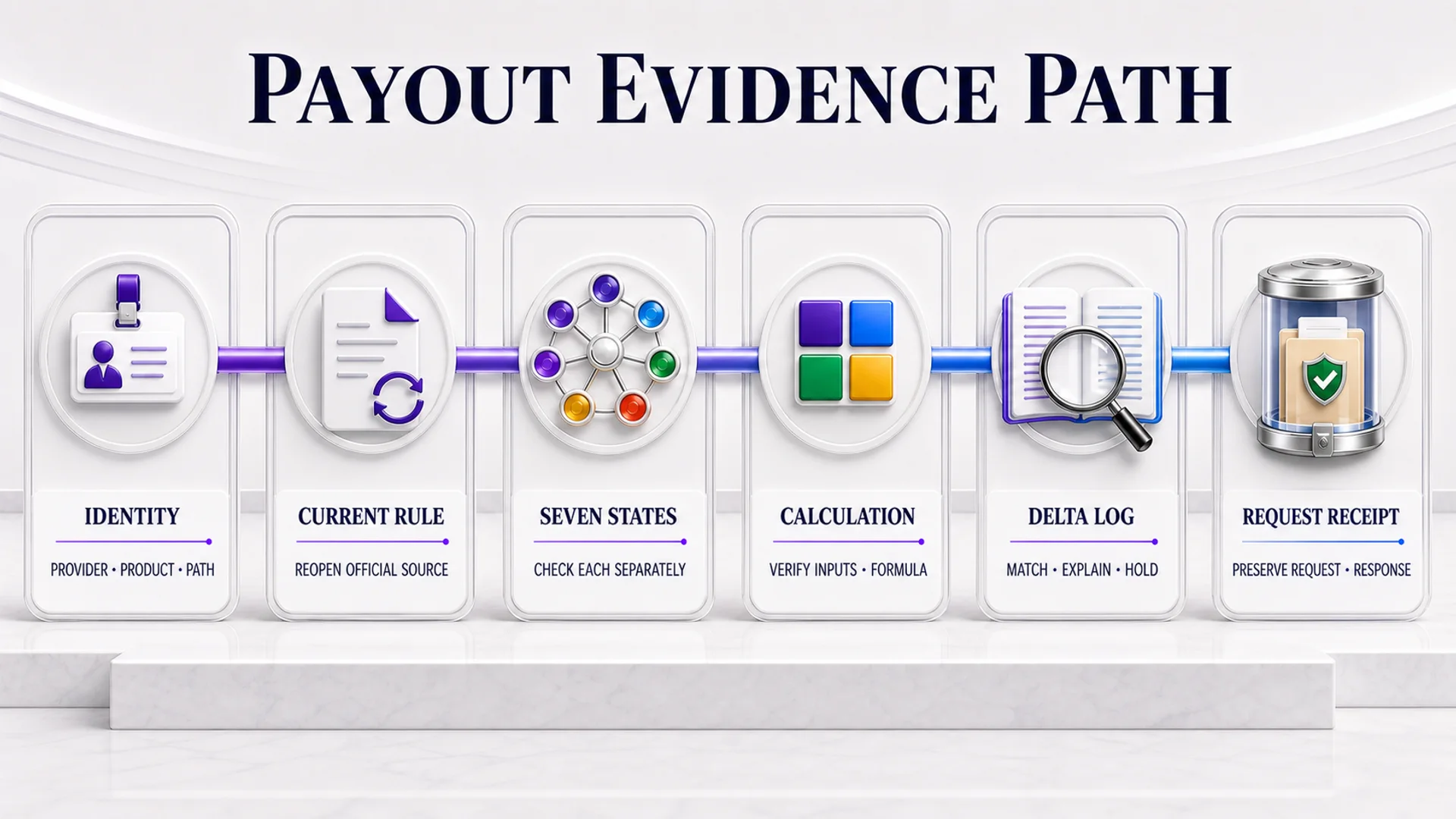
You do not have to practise process discipline alone. Join the Scalping Wolf Live community for educational accountability.
Interactive reflection
If your request button disappeared after a refresh, could your packet show the exact product, source page, dashboard state, capture interval and intervening change without exposing private data? If not, identify the missing evidence ID before proceeding.
Link the verified provider, product, account path and agreement reference to one privacy-safe snapshot ID.
Capture the current source stack, complete all seven state rows and mark every missing input DATA_NOT_AVAILABLE.
Submit each unresolved delta through a verified provider channel and preserve its response and request receipt. Then discuss evidence-discipline lessons in the Scalping Wolf Live Discord, but never share private account data, credentials, account numbers or provider records.
Sources and References
- Source: FTMO — How do I withdraw my reward? — provider-specific, publication-day recheck required.
- Source: FTMO — Trading Objectives — product-specific calculation variation.
- Source: Topstep — Payout Policy — futures-focused path distinctions.
- Source: NIST — FIPS 180-4 — SHA-256 byte-digest standard.
- Source: NIST — IR 8387 — transferred evidence-preservation guidance.
- Source: ICO — Data minimisation — general UK data-minimisation guidance.
- Source: RFC Editor — RFC 3339 and RFC 9557 — timestamp syntax and update.
Scalping Wolf Live is an independent online trading education platform. All content — including blogs, live sessions, AI analysis, and mentorship materials — is strictly for educational purposes only and does not constitute financial advice, investment advice, or trading recommendations. Trading forex, indices, commodities, and cryptocurrencies involves significant risk. You may lose some or all of your invested capital. Past performance is not indicative of future results. Always consult a qualified financial advisor before making any trading decisions.
Ready to learn with funded traders — live?
Discord: https://discord.com/invite/5v8GJMncqV
Website: www.scalpingwolf.live
Frequently Asked Questions
How do prop-firms pay traders after approving a payout request?
A prop-firm payout follows the exact provider, product and account path shown in current provider sources. Your role is to identify the applicable route, satisfy its documented conditions and submit through the authenticated channel. Review, approval, dispatch and settlement remain separate provider-controlled states, so a visible request option does not predict the outcome.
Why would a prop-firm deny a payout request?
Only the provider can state why it denied a particular payout. Possible reasons cannot be inferred safely from another trader’s case or a generic article. Preserve the current rule source, agreement reference, dashboard state and provider explanation, then compare the exact field involved. Do not assign fault or contractual precedence without qualified evidence.
How are prop-firm payouts taxed in the UK?
UK tax treatment depends on your circumstances and the legal character of the payment, so this article cannot classify it for you. Preserve provider statements, receipts, dates, currency and related records, then ask a qualified UK tax adviser or HMRC which reporting treatment applies. Do not copy another trader’s tax conclusion into your own records.
Has anyone else experienced a prop-firm payout delay after approval?
A long pending period is not enough to classify a provider’s process as normal, improper or failed. Check the provider’s current stated timeline, authenticated request status and any dated support response. Preserve the request ID and ask one narrow question about the delay. Avoid resubmitting merely because the elapsed time feels unusual.
Can shared devices cause issues later during payout or account reviews?
They may matter only where the exact provider’s current identity, device, network or account-ownership rules say they matter. Do not generalise from forum experiences. Reopen the relevant provider page, record the product and account context, and ask verified support before acting. Keep KYC documents and credentials inside the provider’s controlled channel.
What should you check before trusting an instant-funding prop-firm payout?
Verify the provider identity, exact domain, product path, date, source context and whether the claim is independently supported. A screenshot or testimonial may omit review conditions, account stage or later reversals. Treat third-party payout claims as leads, not account-specific evidence, and return to authenticated provider sources before making any request decision.
Want more educational process walkthroughs? Watch the latest Scalping Wolf Live market-analysis videos on YouTube.
